
Resale POS systems power busy secondhand and consignment operations where speed matters: scanning items, pricing, tagging, customer lookups, returns, store credit, layaway, and sometimes online listings synced to marketplaces.
That same convenience can become a security liability if the POS is treated like “just a cash register.” In reality, a resale POS is a high-value target because it touches payment data, customer identities, employee permissions, inventory valuation, and financial reporting all in one place.
A single breach can trigger chargebacks, fraud losses, downtime, brand damage, and expensive compliance obligations.
Security practices for resale POS must match how resale stores actually operate: frequent staff turnover, shared terminals, mixed device types, high transaction volume during peak drops, and lots of customer contact.
Resale stores also manage unique sensitive data such as consignment payee details, tax forms in some workflows, and store credit balances that are as good as cash. Attackers know this and look for weak passwords, unpatched devices, exposed Wi-Fi, and employees who can be tricked into installing “support tools.”
This guide explains best security practices for resale POS with clear steps you can apply today. You’ll learn how to reduce risk across devices, networks, staff access, data storage, payments, and incident response.
You’ll also see practical future predictions so your resale POS security strategy stays effective as threats evolve. Throughout the article, you’ll find relevant terms used by auditors and security teams, but the language stays easy to read and store-friendly.
Why Resale POS Systems Are Unique Security Targets

Resale POS environments combine retail speed with financial account management. Unlike a typical retail POS that sells new products and moves on, resale operations keep customer and seller information over time.
That means the resale POS becomes a long-term database of names, phone numbers, emails, purchase histories, store credit balances, payout histories, and sometimes identity verification notes.
If that information is exposed, it can lead to account takeovers, targeted scams, and fraudulent returns—especially when store credit is involved.
Resale POS workflows also create “insider risk” opportunities. Employees can manipulate pricing, override discounts, void transactions, issue refunds to their own cards, convert cash refunds to store credit, or edit payout records if permissions are too broad.
Because resale stores often rely on seasonal or part-time labor, strong access control and monitoring are essential security practices for resale POS.
Another reason resale POS security is challenging is device diversity. Many resale stores use iPads, Android tablets, barcode scanners, receipt printers, label printers, cash drawers, and sometimes older Windows PCs for back-office work.
Each device becomes part of the attack surface. If just one device is compromised—like a back-office computer used for email—it can become a stepping stone into the network where the resale POS lives.
Finally, resale POS systems often integrate with ecommerce, accounting, shipping, marketing, and marketplace listing tools. Every integration is a potential pathway for data leakage if tokens are mismanaged or third-party security is weak.
Best security practices for resale POS must include vendor controls and integration hygiene, not just passwords and antivirus.
Threat Landscape for Resale POS: What Attackers Actually Do

Most resale POS incidents come from predictable playbooks. The first is credential abuse. Attackers obtain passwords from reused credentials, phishing emails, or leaked databases. If the resale POS login is the same as an email password—or if staff share a single login—attackers can walk right in.
Once inside, they may export customer lists, modify payout records, or generate refund fraud. This is why multi-factor authentication and unique logins are foundational security practices for resale POS.
The second playbook is remote access fraud. Scammers call pretending to be “POS support,” “your payment processor,” or “your label printer vendor.” They pressure staff to install remote tools or provide one-time codes.
Once an attacker has remote control, they can plant malware, capture keystrokes, or change bank deposit settings. Resale stores are especially vulnerable because they rely on vendors for hardware and software troubleshooting and may accept unexpected support calls.
The third playbook is network intrusion through weak Wi-Fi or exposed routers. Stores sometimes use consumer-grade routers with default passwords, outdated firmware, or open ports.
Attackers can break into poorly secured Wi-Fi, then probe devices. Even when payment data is tokenized, network access can still allow inventory manipulation, ransomware, or theft of customer databases.
A fourth playbook is ransomware targeting back-office systems that hold exports, reports, and accounting files. Even if your resale POS is cloud-based, staff computers may store daily exports, payout lists, employee files, or scanned documents.
Ransomware encrypts these and demands payment. Without backups and a response plan, downtime becomes the real cost.
Understanding these threats helps you choose resale POS security practices that reduce real risk rather than adding busywork.
Security Governance: Policies That Actually Work in a Resale Store

Security governance sounds formal, but the best security practices for resale POS can be simple and store-friendly. Governance means deciding “how we do security here” and making it consistent.
Start with three short policies: access policy, device policy, and incident policy. Each policy should be written in plain language, posted internally, and reviewed every quarter.
An access policy defines who gets a login, when accounts are removed, what password rules apply, and which roles can do high-risk actions like refunds, price overrides, and payout edits.
For resale POS, it should also cover temporary staff and volunteers, since those are common in resale events. A good access policy reduces the “everyone is an admin” problem that leads to fraud.
A device policy defines which devices can access the resale POS, how updates are installed, whether personal devices are allowed, and how lost devices are handled. If you allow tablets on the sales floor, the policy should require screen locks, automatic updates, and approved apps only. If a device is lost, you need a way to revoke access quickly.
An incident policy defines what to do when something feels wrong: suspicious refunds, strange payout changes, staff receiving “support” calls, or malware alerts.
The goal is speed and clarity. Staff should know who to call, what to disconnect, and what not to touch. The best security practices for resale POS are the ones your team can follow under pressure.
Governance also includes assigning ownership. Even a small store should name a security owner—often the operations manager—responsible for access reviews, vendor coordination, and monthly checks. This role doesn’t require a technical background, only consistency.
Role-Based Access Control for Resale POS: Stop Sharing Logins
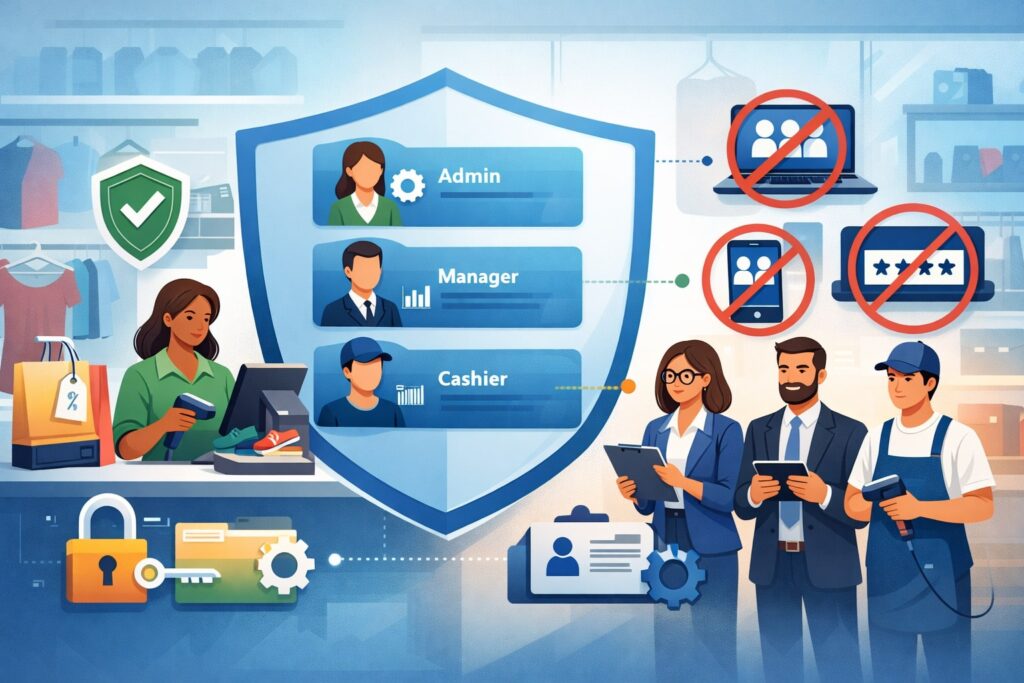
Role-Based Access Control (RBAC) is one of the most effective security practices for resale POS because it reduces both external risk and internal abuse. Every person should have their own account.
Shared logins destroy accountability and make it impossible to investigate fraud. In a resale store, shared logins also lead to accidental mistakes because employees may not see the right screens or warnings.
Design roles based on what people actually do. A cashier role should be able to process sales, accept returns within policy, and apply standard discounts. A supervisor role can override refunds above a certain amount, approve voids, and edit limited customer details.
A manager role can manage inventory, create promotions, edit payout records, and view reports. An admin role should be extremely rare and restricted to owners or trusted managers.
The most important RBAC step is limiting high-risk actions: refunding to a different tender type, issuing store credit without a receipt, editing payout bank details, exporting customer lists, and changing tax settings.
These actions should require manager approval or dual control. Dual control means two different users must approve a sensitive action, such as changing deposit settings or issuing large manual credits.
RBAC also matters for integrations. If a marketing tool only needs email addresses, do not allow it access to full purchase histories and phone numbers. If an ecommerce sync only needs inventory fields, don’t share a full admin token.
Tight permissions are foundational security practices for resale POS because they reduce “blast radius” when something goes wrong.
Strong Authentication: MFA, Passkeys, and Session Controls
Passwords alone are not enough. Multi-factor authentication (MFA) is a must-have for best security practices for resale POS, especially for manager accounts, back-office logins, and remote access.
MFA stops most credential theft attacks because a stolen password is not enough to log in. Use app-based authenticators when possible, and avoid SMS if a better option exists, since SIM-swap scams can intercept texts.
For resale POS, MFA should be paired with smart session controls. Set shorter session timeouts on manager screens and require re-authentication for high-risk actions like refunds, payout edits, exporting data, and changing settings. This protects you when an employee walks away from a terminal during a rush.
Passkeys are a growing trend that can improve resale POS security. Passkeys use cryptographic authentication tied to a device, which reduces phishing risk because there is no password to steal.
If your resale POS vendor supports passkeys or modern authentication, adopt it for admin accounts first. Even if cashiers can’t use passkeys due to shared devices, managers and owners typically can.
Also enforce basic password hygiene: long passwords or passphrases, no reuse, and no storing passwords on sticky notes. A password manager is a practical tool for resale POS admins who manage multiple vendors.
One of the simplest security practices for resale POS is to standardize MFA and password storage so people don’t improvise under stress.
Device Security for POS Terminals, Tablets, and Back-Office Computers
Device security is where many resale POS programs fail, because stores focus on the software but forget the hardware. Every device that touches the resale POS should be treated as a security asset. Start by inventorying devices: POS terminals, tablets, PCs, barcode scanners, printers, and networking hardware. You can’t secure what you can’t list.
For tablets, enable strong screen locks, automatic OS updates, and device encryption. Restrict app installation to approved apps only. If your POS runs in a browser, lock the device into kiosk mode so staff can’t browse random websites or install extensions. This matters because browser-based malware can steal session tokens or redirect logins.
For Windows or Mac back-office computers, turn on full-disk encryption, automatic updates, endpoint protection, and a standard user account for daily work. Admin accounts should be separate and used only for software installs. Many resale POS security incidents start with a phishing email opened on a back-office computer, leading to malware and stolen credentials.
Peripheral devices matter too. Label printers and receipt printers often run on local networks and may have web interfaces with default passwords. Change those defaults, update firmware when available, and limit access to management panels. These are overlooked but important security practices for resale POS because attackers look for the easiest entry point.
Finally, secure remote management. If you use remote desktop tools, keep them on a separate admin device, enforce MFA, and restrict access by IP when possible. Never allow staff to install random “support” tools because someone called the store.
Network Security: Segmentation, Secure Wi-Fi, and Router Hardening
Your network is the highway connecting devices, the resale POS, and the internet. If it’s insecure, everything else becomes harder. Network segmentation is one of the best security practices for resale POS because it separates systems so a compromise doesn’t spread.
At minimum, use separate networks for: POS devices, guest Wi-Fi, and back-office computers. Guest Wi-Fi should never share the same network as your resale POS devices.
Secure Wi-Fi with modern encryption and strong credentials. Use WPA3 when available, or WPA2 with a strong passphrase. Rotate the Wi-Fi password on a schedule, especially after staff turnover. Avoid posting the internal Wi-Fi password where customers can see it. If you need customer Wi-Fi, create a separate guest network.
Router hardening is a must. Change default admin usernames and passwords, disable remote administration unless you truly need it, and keep firmware updated. Many resale stores use routers that are never updated after installation.
That creates years of known vulnerabilities. Also disable unused services like UPnP, which can open ports without your knowledge.
If you have multiple locations, consider using a managed firewall or a security-focused router with logging. Logs help you investigate incidents and prove what happened. Good resale POS security practices include visibility, not just prevention.
Payment Security: PCI DSS Alignment Without the Headache
Payment security is central to resale POS because card data is a primary target. The good news is modern systems can reduce your exposure through tokenization and point-to-point encryption (P2PE).
Even so, you still have responsibilities under PCI DSS (Payment Card Industry Data Security Standard). Following PCI-aligned resale POS security practices reduces breach risk and helps you pass required attestations.
Start by using EMV chips and contactless transactions whenever possible. Avoid manual card entry except when necessary, and restrict who can key in cards. Manual entry increases fraud risk and may trigger higher fees or stricter controls.
Also avoid storing card numbers in any notes field, customer profile field, or external spreadsheet. Even “last four digits” should be stored only if your POS supports it safely.
Ensure your payment terminals are certified and sourced from trusted channels. Tampered terminals can skim data. Train staff to inspect terminals daily: look for broken seals, odd overlays, or loose cables. Keep terminals in view of staff, not reachable by customers without oversight.
If your resale POS supports P2PE, consider adopting it for an extra security layer. P2PE encrypts card data at the swipe/dip/tap point so your network never sees usable card information. That reduces the impact of network compromise.
Finally, complete PCI questionnaires honestly and keep documentation. The best security practices for resale POS include compliance discipline because it forces regular reviews of devices, vendors, and policies.
Data Protection: Customer, Consignor, and Store Credit Information
Resale stores often hold more personal data than they realize. Customer profiles may include contact details, purchase history, and store credit balances.
Consignor records can include payout histories and tax-related details depending on your workflow. Protecting this data is essential for resale POS security practices because data theft can lead to fraud and regulatory obligations.
Use data minimization: collect only what you need. If you don’t need a birthdate, don’t ask for it. If you don’t need an address, don’t store it. Less data means less risk. Also set retention rules. Do you need customer records from seven years ago? If not, archive or delete according to a clear policy.
Encrypt sensitive data in transit and at rest. Most cloud POS vendors provide this, but you should confirm it and understand your responsibilities. If you export reports, store them in encrypted storage with access control, not on shared desktops. Limit who can export data and track exports with logs.
Store credit is a special case. Store credit balances are attractive to attackers because they can be converted into goods quickly. Require manager approval for manual store credit adjustments, track every credit issuance, and set alerts for unusual credit creation.
Also consider requiring identity verification for high-value store credit redemptions. These are practical security practices for resale POS that directly reduce fraud.
Staff Security Training: Social Engineering, Refund Fraud, and Daily Habits
The strongest technical controls fail if staff are not trained. Resale POS security training should be short, specific, and repeated. The goal is not to make everyone a security expert. The goal is to reduce the most common mistakes: clicking phishing links, sharing passwords, falling for fake support calls, and ignoring suspicious refund behavior.
Train staff to recognize social engineering scripts. Common red flags include urgency, threats, requests for one-time codes, and instructions to install remote tools. Teach a simple rule: no one gets remote access or MFA codes over the phone. If a vendor calls, staff should hang up and call the vendor back using a known number from official documentation.
Refund fraud training is especially important in resale. Staff should understand return rules, receipt requirements, and how store credit can be abused. Teach them to watch for patterns: multiple returns without receipts, requests to refund to a different card, repeated “accidental” double scans, or frequent voids by the same employee.
Daily habits matter. Lock the screen when stepping away. Do not write passwords near terminals. Do not plug in unknown USB devices. Use approved channels for support. These simple behaviors are still some of the best security practices for resale POS because they stop the easy attacks that cause most losses.
Logging, Monitoring, and Alerts: Catch Problems Early
You can’t respond to what you can’t see. Logging and monitoring are core resale POS security practices because they help you detect fraud, misuse, and suspicious activity early. Start by enabling audit logs in your POS platform if available. Audit logs should show who did what and when: refunds, voids, discounts, payout edits, exports, and permission changes.
Next, set up alerts for high-risk events. Useful alerts include: large refunds, repeated refunds by one user, manual store credit issuance above a threshold, payout bank detail changes, new admin account creation, and mass exports. Even if your POS doesn’t have built-in alerts, you can create a daily report review checklist.
Monitoring should also cover devices and networks. Use your router or firewall logs to track unusual outbound connections. Ensure endpoint protection is installed on back-office computers and configured to report threats. For a small resale business, you don’t need a full security operations center. You need consistent review and a plan for escalation.
A practical approach is weekly “security review” time: 20–30 minutes to check logs, review staff access, confirm backups, and scan for anomalies. Consistency is what turns resale POS security practices into real protection.
Secure Integrations and Third-Party Vendor Management
Resale POS systems rarely operate alone. Integrations with ecommerce platforms, shipping tools, email marketing, loyalty, accounting, and analytics are common. Each integration expands the attack surface. Best security practices for resale POS require you to treat integrations like external doors to your data.
Start by reviewing which apps and services have access to your POS. Remove unused integrations. For each remaining integration, verify what permissions it has and reduce them if possible.
Use separate API keys for separate integrations rather than sharing one master credential. Rotate keys on a schedule, and immediately rotate them when a staff member with access leaves.
Vendor management matters too. Ask vendors about encryption, authentication, incident response, and data retention. If a vendor cannot explain how they protect your data, that’s a risk signal.
For critical vendors, document support procedures: who can request changes, what verification steps are required, and how bank deposit changes are handled.
A common failure is vendor impersonation. Attackers pretend to be “your ecommerce sync provider” and request access. Train staff to verify vendor requests.
Also restrict who can approve vendor access and require written requests. These vendor-focused resale POS security practices are often the difference between a safe environment and a preventable breach.
Backups and Business Continuity: Survive Outages and Ransomware
Resale stores lose money fast when the POS is down. Business continuity is therefore part of security. Good resale POS security practices include reliable backups, offline procedures, and recovery steps you can execute quickly.
If your POS is cloud-based, clarify what the vendor backs up and what you must back up. Many vendors protect their infrastructure but do not protect your local exports or custom files.
Back up essential data such as inventory snapshots, daily sales summaries, consignment payout reports, and store credit reports. Store backups in a secure cloud storage account with MFA and limited access.
Create an “offline mode” plan. If the internet drops, can you take cash-only sales? Can you write manual receipts and enter them later? Do you have a hotspot as a backup internet? These plans don’t have to be complex, but they should be written and tested.
Ransomware recovery requires clean backups. Backups must be versioned so you can restore from before the infection. Also practice recovery. Once per quarter, perform a test: restore a report, reinstall a device, and verify logins.
The best security practices for resale POS include rehearsals because real incidents are stressful and time-sensitive.
Incident Response for Resale POS: A Store-Friendly Playbook
Incident response is how you reduce damage when something goes wrong. A resale POS incident can be technical (malware, account compromise) or operational (refund fraud, insider abuse). Your incident plan should be simple enough that staff can follow it during a busy day.
Define what counts as an incident: suspicious refunds, unexpected payout changes, unknown admin accounts, POS devices behaving oddly, antivirus alerts, a vendor asking for MFA codes, or customers reporting unauthorized charges.
Then define the first actions: isolate the device, stop using the affected terminal, notify the security owner, and document what happened.
For suspected account compromise, reset passwords, revoke sessions, rotate API keys, and review logs. For suspected device malware, disconnect the device from the network, preserve it for investigation, and use a clean device for operations.
For suspected payment terminal tampering, stop using the terminal and contact your payment provider using verified contact methods.
Also prepare your external contacts in advance: POS vendor support, payment provider, IT support, and legal or insurance contacts if applicable. During an incident, nobody should be hunting for phone numbers.
Incident response is one of the best security practices for resale POS because it turns chaos into a checklist and reduces downtime and losses.
Privacy, Regulations, and Consumer Protection Considerations
Resale POS security is not only about stopping hackers. It’s also about protecting customer and consignor privacy. Many states have privacy and breach notification laws that can apply when personal data is exposed. In some locations, consumer protection agencies may also expect reasonable safeguards and transparent disclosure when incidents occur.
A practical privacy approach is to treat customer and consignor data with “need-to-know” access. Limit who can view full profiles. Mask sensitive fields where possible. Do not use customer lists for unrelated marketing without appropriate consent settings. Maintain a clear privacy notice that explains what data you collect and why.
Also consider identity verification and fraud prevention practices that remain respectful. For example, requiring ID for high-value refunds or large store credit redemptions can reduce fraud, but it should be applied consistently and stored carefully. If you must record any ID details, store only what is necessary and protect it using restricted access and retention limits.
When compliance questions come up, document your controls: MFA enabled, access roles defined, logs reviewed, backups maintained, terminals inspected. Documentation supports your case if you face disputes, complaints, or investigations.
Privacy-minded resale POS security practices protect trust, not just transactions.
Future Predictions: Where Resale POS Security Is Headed
Resale POS security is evolving quickly because fraud tactics and technology are changing. One major trend is the move from passwords to phishing-resistant authentication like passkeys and hardware security keys.
As POS vendors adopt these options, expect MFA to become standard for all roles, not just admins. Stores that prepare now by standardizing identity management will transition more smoothly.
Another trend is real-time fraud detection using behavioral analytics. POS platforms will increasingly flag unusual behavior: sudden spikes in refunds, rapid store credit issuance, unusual login locations, or inventory manipulation patterns.
This will shift resale POS security practices from purely preventive controls to “detect and respond” models. Stores that keep clean logs and consistent roles will benefit the most from these tools.
Payment security will continue moving toward tokenization everywhere, with more controls on manual entry and stronger device attestation (proving a device is trusted).
Expect more pressure to keep devices updated and to use certified payment hardware. Standards like PCI DSS v4.0 push for continuous risk management rather than periodic check-the-box compliance, meaning resale POS security will become more ongoing.
Finally, ransomware will keep targeting small and mid-sized retailers because downtime is expensive and pressure to pay is high. The winning strategy will be resilient backups, segmented networks, and strong staff training against phishing. Future-ready security practices for resale POS will focus on recovery speed as much as prevention.
FAQs
Q.1: What are the most important security practices for resale POS to start with?
Answer: Start with unique user accounts, role-based access control, and multi-factor authentication for all managers and admins.
Then secure devices with updates and screen locks, segment your network so POS devices are separate from guest Wi-Fi, and enable audit logs for refunds, voids, and payout changes. These steps reduce the biggest risks quickly and create visibility when something suspicious happens.
Q.2: How can a resale store prevent refunds and store credit fraud in the POS?
Answer: Use RBAC so only supervisors can approve high-risk refunds and manual store credit. Require re-authentication for large refunds, set thresholds for manager approval, and review daily reports for unusual patterns like repeated voids or credits.
Train staff to follow consistent return rules and to escalate suspicious activity. Monitoring and consistency are key resale POS security practices for fraud control.
Q.3: Do cloud-based resale POS systems eliminate security responsibility?
Answer: No. Cloud POS reduces infrastructure burden, but you still control staff access, device security, network security, exports, and integrations. You also manage operational risks like social engineering and insider fraud. Best security practices for resale POS still apply because attackers often target logins, staff behavior, and connected devices.
Q.4: What should staff do if someone calls claiming to be POS support and asks for access?
Answer: Staff should refuse and escalate. Do not share passwords, do not share MFA codes, and do not install remote access tools. Hang up and call the vendor back using a verified number from your internal documentation or vendor portal. Fake support calls are one of the most common resale POS security threats, and a strict verification rule prevents many incidents.
Q.5: How often should a resale store review access and security settings?
Answer: At minimum, review staff access monthly and immediately after staff changes. Review logs weekly for high-risk actions like refunds and payout edits. Patch devices on an automatic schedule, and review integrations quarterly to remove unused apps. Regular review is one of the simplest, most effective security practices for resale POS.
Conclusion
Security practices for resale POS work best when they match real store operations: fast-paced checkouts, frequent staff changes, and lots of financial account activity through refunds, store credit, and consignor payouts.
The strongest blueprint starts with basics that deliver big risk reduction: unique logins, RBAC, MFA, secure devices, segmented networks, and PCI-aligned payment handling. From there, you strengthen resilience with backups, monitoring, and a clear incident response checklist.
Resale POS security is not a one-time setup. It’s a routine—small actions repeated consistently. Weekly log reviews, monthly access checks, quarterly integration cleanup, and regular staff training create a security culture that stops common attacks and reduces losses.
As security technology evolves toward passkeys, real-time fraud analytics, and stricter compliance expectations, stores that build strong foundations now will adapt faster and operate with less disruption.